How Do AI Image Generators Work? (From Prompt to Image, Step by Step)
最后更新: 2025-12-25 10:06:25

What Happens After You Type a Prompt? (The Simple, Accurate Explanation)
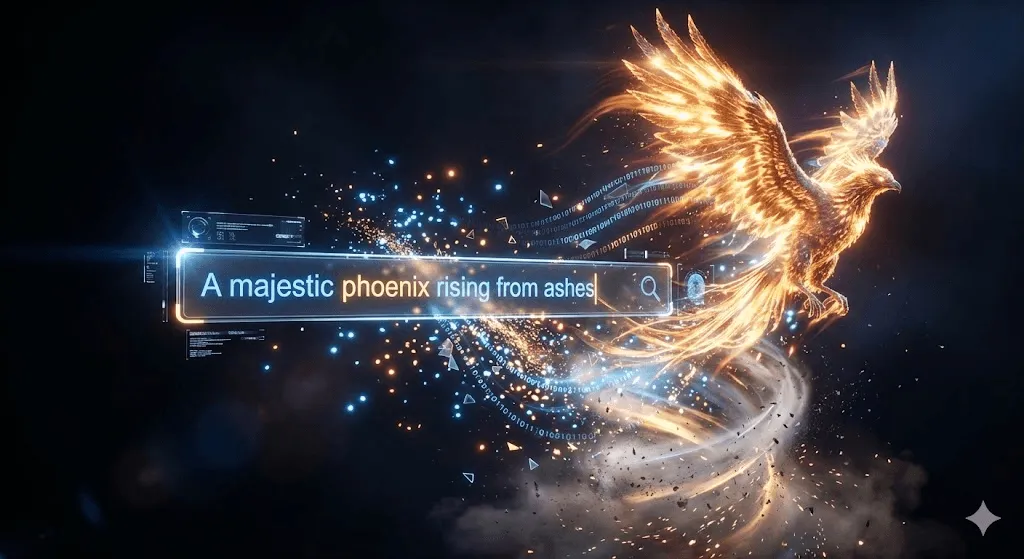
Here's a scenario most of us have experienced by now: you type something like "a cat wearing a wizard hat, oil painting style" into Midjourney or DALL-E, hit enter, and 30 seconds later you're looking at an image that never existed before. It feels almost like magic.
But it's not magic. It's math a lot of math. And honestly, understanding how this technology works isn't just academically interesting. It makes you better at using these tools. Once you know why certain prompts work and others don't, you stop guessing and start crafting.
So let's break this down. Not at PhD level (there are papers for that), but deep enough that you'll actually understand what's happening under the hood.
Quick Summary (30 seconds):
AI image generators turn your prompt into numbers (text embeddings), start from random noise in a compressed “latent space,” then use a diffusion model to remove noise step by step while your prompt guides the process. Finally, the result is decoded back into pixels. Settings like CFG (guidance scale), steps, and seeds control how closely the image follows your prompt and how consistent results are.
The Two Problems AI Image Generators Solve
Every AI image generator works by solving two separate but connected problems: understanding your prompt and generating the image.
Problem one: understanding what you mean. When you type "sunset over mountains with dramatic lighting," the system needs to parse this into concepts it can work with. What does "dramatic" mean visually? How do sunset colors interact with mountain shadows? This is where natural language processing comes in.
Problem two: actually making pixels. The system has to output millions of color values that form coherent objects, realistic lighting, and proper perspective all while following your instructions. That's the computer vision piece.
Modern systems solve both problems using neural networks, which are computational structures loosely inspired by how neurons in our brains connect and communicate.
Neural Networks: The Foundation
Before diving into the specific architectures, it helps to understand what neural networks actually do with images.
Computers don’t “see” images like we do they read them as huge grids of numbers. A 512×512 color image? That's 786,432 individual values (512 × 512 pixels × 3 color channels). The neural network's job is finding patterns in this sea of numbers.
During training, these networks process millions of images. Stable Diffusion, for example, trained on LAION 5B a dataset containing roughly 5.85 billion image–text pairs collected from publicly available sources across the web. Each image comes with associated text (alt tags, captions, surrounding content), which teaches the model associations between language and visual concepts.
Through this process, the network learns patterns at multiple levels: early layers pick up edges and basic shapes, middle layers recognize parts (eyes, wheels, leaves), and deeper layers understand complete concepts and styles.
From GANs to Diffusion: How the Technology Evolved
The AI image generation landscape has shifted dramatically in recent years. Understanding this evolution helps explain why today's tools work so much better than what we had even three years ago.
The GAN Era (2014~2021)
Generative Adversarial Networks, introduced by Ian Goodfellow in 2014, dominated for years. The core idea is elegant: pit two neural networks against each other.
One network (the generator) tries to create fake images. The other (the discriminator) tries to spot fakes. As the discriminator gets better at catching fakes, the generator has to improve to fool it. It's an arms race that pushes both networks toward excellence.
GANs produced impressive results by 2019, StyleGAN could generate photorealistic faces of people who don't exist. But they had problems. Training was unstable (the two networks could fall out of sync), and they struggled with complex scenes involving multiple objects or fine details like hands.
The Diffusion Revolution (2020 Present)

In 2020, Jonathan Ho, Ajay Jain, and Pieter Abbeel at UC Berkeley published "Denoising Diffusion Probabilistic Models" (DDPMs). This paper changed everything.
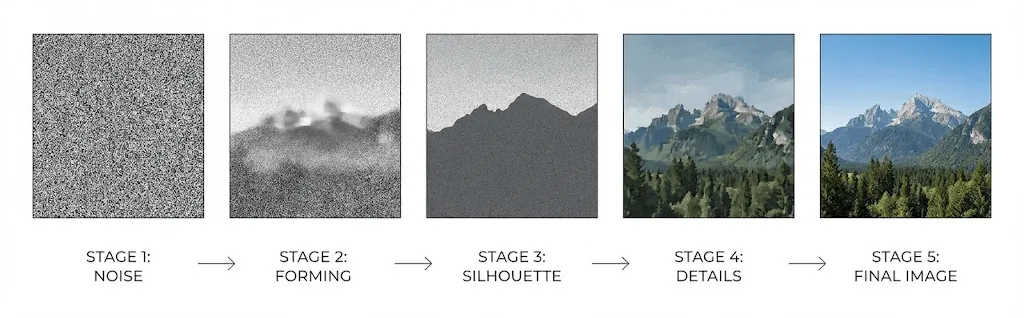
Diffusion models work by learning to reverse noise: they start with random static and gradually “denoise” it into an image. Start with an image, gradually add noise until it's pure static, then train a neural network to reverse that process.
Forward process: Take a training image and progressively add Gaussian noise over many steps (typically 1,000) until the image becomes unrecognizable static.
Reverse process: Train a network to predict and remove the noise at each step, gradually reconstructing a coherent image from pure randomness.
Why does this work better than GANs? The step by step approach is inherently more stable (no adversarial dynamics to balance). The models also produce more diverse outputs and follow complex prompts more reliably.
In 2021, Dhariwal and Nichol published "Diffusion Models Beat GANs on Image Synthesis," making it official: diffusion had won.
How Text to Image AI Works (Step by Step Pipeline)
When you enter a prompt into Stable Diffusion, DALL-E, or Midjourney, here's what actually happens:
Step 1: Text Encoding with CLIP
Your text first passes through a text encoder usually CLIP (Contrastive Language Image Pre training), developed by OpenAI.
CLIP was trained on 400 million image text pairs to understand relationships between language and visual concepts. It converts your prompt into a high dimensional vector (typically 768 or 1024 dimensions) that captures semantic meaning.
This vector exists in a shared "embedding space" where similar concepts cluster together. "Dog" and "puppy" produce similar vectors; "dog" and "skyscraper" produce very different ones.
Step 2: Working in Latent Space
Here's where things get clever. Working directly with high resolution images is computationally brutal. So modern systems operate in "latent space" a compressed representation.
In their 2022 paper introducing Stable Diffusion, Rombach et al. demonstrated that diffusion could happen in this compressed space while maintaining quality a breakthrough that made the technology accessible to consumers.
Stable Diffusion compresses a 512×512 image (786,432 values) down to a 64×64 latent representation (just 16,384 values) a 48× reduction. This is why you can run it on a consumer GPU instead of needing a data center.
Generation starts with random noise in this latent space. Think of it as a very compressed, blurry canvas of static.
Step 3: Iterative Denoising
Now comes the core process. A U Net (a neural network architecture shaped like the letter U, originally developed for medical image segmentation) performs denoising over multiple steps typically 20 50 iterations.
At each step, the U Net receives:
- The current noisy latent representation
- The text embedding from CLIP (your prompt, encoded)
- A timestamp indicating which step this is
The network predicts how much noise exists in the current image, then removes a calculated portion. Early steps establish composition and major shapes. Later steps refine textures and details.
The text embedding guides this process through "cross attention" mechanisms the network literally pays attention to relevant parts of your prompt while deciding what to add or remove at each location.
Step 4: Decoding Back to Pixels
After denoising completes, a decoder (a Variational Autoencoder or VAE) expands the compressed latent representation back to full resolution. This "upsampling" reconstructs the fine details that were compressed away initially.
CFG (Guidance Scale): The One Setting That Changes Prompt Accuracy
If you’ve used Stable Diffusion, you’ve seen “CFG” or “guidance scale” it directly controls how literally the model follows your prompt. or "guidance scale." Most people just leave it at 7 because that's what tutorials suggest. But knowing what it does helps you control your results.
CFG stands for "classifier free guidance." During each denoising step, the model actually runs twice:
- Once with your prompt: What should this image look like given your specific text?
- Once without any prompt: What would a "generic" image look like here?
The final output emphasizes the difference between these two predictions. Higher CFG values push the result more strongly toward your prompt's concepts.
But there's a tradeoff:
- Low CFG (1 5): More creative, but might ignore your prompt
- Medium CFG (7 12): Usually the sweet spot
- High CFG (15+): Follows prompt closely, but can cause oversaturation and artifacts
Major Tools Compared: DALL-E vs Midjourney vs Stable Diffusion
All major image generators use diffusion models now, but their implementations differ significantly.
DALL-E 3 (OpenAI)
OpenAI's approach integrates ChatGPT directly. When you enter a prompt, GPT 4 actually rewrites and expands it before generation which is why DALL-E often interprets simple prompts in surprisingly sophisticated ways. Great for casual users; less control for power users who want exact prompt adherence. Notably strong at rendering text within images, which historically has been a weakness for AI generators.
Midjourney
Midjourney's model seems optimized for aesthetic quality over literal accuracy. Results often have a "painterly" or cinematic quality that many find more visually appealing than other generators, even when they don't perfectly match the prompt. The Discord based interface is unusual but has created a strong community. Less transparent about technical details than competitors.
Stable Diffusion
The open source option. You can run it locally, see exactly how it works, and modify anything. This has spawned an enormous ecosystem of fine tuned models, LoRAs (low rank adaptations for adding specific concepts), and extensions. The best choice if you want maximum control, need privacy, or want to train custom models. Steeper learning curve than the others.
Adobe Firefly
Trained exclusively on Adobe Stock images, openly licensed content, and public domain works. This makes it uniquely suitable for commercial use where copyright concerns matter. Deep integration with Photoshop and Illustrator. More conservative outputs than competitors you won't get edgy or controversial content, by design.
Beyond Basic Generation
Text to image is just the starting point. Modern systems support several additional capabilities worth understanding.
Image to Image (img2img)
Instead of starting from pure noise, you start with an existing image that's been partially noised. The "denoising strength" parameter controls how much noise is added and thus how much the output can deviate from the input. Low strength gives subtle style changes; high strength gives complete reimagination using only composition cues from the original.
Inpainting and Outpainting
Inpainting regenerates specific masked regions while keeping everything else intact useful for removing unwanted objects or replacing elements. Outpainting extends images beyond their original boundaries, generating coherent content that continues the existing scene.
ControlNet
ControlNet adds structural guidance to the generation process. You can provide edge maps, depth maps, pose skeletons, or segmentation masks to control exactly where elements appear. This is huge for consistent character design or when you need precise spatial control that prompts alone can't achieve.
LoRA and DreamBooth
Want the AI to generate images of a specific person, product, or style that wasn't in the training data? LoRA (Low Rank Adaptation) and DreamBooth let you fine tune models on small custom datasets sometimes just 20 30 images. The result is a model that can generate that specific concept on demand.
Current Limitations (And Why They Exist)
AI image generators have known failure modes. Understanding them helps you work around them.
The Infamous Hand Problem
AI generators notoriously produce hands with wrong finger counts, merged digits, or anatomically impossible configurations. This isn't a bug to be fixed it's a fundamental challenge.
Hands appear in training data at wildly variable angles, positions, and levels of occlusion. They're small relative to full images, so they get less "attention" during training. And the statistical patterns for "correct hand" are simply harder to learn than more consistent features like faces. Recent models have improved, but it remains an issue.
Text Rendering
Until DALL-E 3, generating legible text in images was nearly impossible. The models understand words semantically (what they mean) but struggle with typography (how letters look). DALL-E 3 has made significant progress here, but complex text layouts remain unreliable across all platforms.
Consistency Across Images
Each generation starts with different random noise, so generating the same character or scene consistently is difficult. Solutions exist seed locking, reference images, character LoRAs but none fully solve the problem. This limits use cases like comic creation or brand character development.
Spatial Reasoning
"The red ball is to the left of the blue cube, which is behind the green pyramid" often produces incorrect arrangements. The models understand individual objects but struggle with complex spatial relationships between multiple elements.
The Copyright Question
This is where things get complicated legally and ethically.
Training Data
Most AI image models trained on billions of images scraped from the internet, often without explicit consent from original creators. Multiple lawsuits are currently challenging whether this constitutes copyright infringement. The legal landscape is genuinely unsettled.
Output Ownership
In the United States, the Copyright Office has ruled that purely AI generated images cannot receive copyright protection copyright requires human authorship. However, images with "sufficient human creative input" in the process may qualify. Where exactly that line falls remains unclear and is actively being litigated.
Platform terms of service also matter. Most commercial platforms grant users rights to generated images, but read the fine print for your specific use case.
Practical Tips for Better Results
Understanding the technology enables more effective prompting. Here's what actually works:
Front load important concepts
The text encoder weights words by position. "Sunset, dramatic lighting, mountain landscape" emphasizes differently than "A landscape with mountains at sunset." Put your most important elements first.
Use references the model knows
Models learn from training data. Referencing known artists, art movements, camera types, or film stocks ("shot on Kodak Portra 400") triggers associated visual patterns more reliably than abstract descriptions. "Rembrandt lighting" is more precise than "dramatic side lighting."
Iterate, don't perfect
Generation is rarely one shot. Generate variations, identify what works, refine your prompt. Use img2img with successful generations to iterate on specific aspects while preserving overall composition.
Use negative prompts
Negative prompts specify what to avoid: "blurry, distorted, extra fingers, watermark, low quality." They work by reducing those concepts' influence during denoising. Building a good negative prompt library prevents common failure modes.
What's Coming Next
The field moves fast. Several developments are worth watching:
- Video generation: Sora, Runway Gen 3, and others are extending diffusion to video. Text to video at high quality is becoming real.
- 3D generation: Text to 3D and image to 3D tools are maturing rapidly, with implications for gaming, product visualization, and VR.
- Real time generation: Optimizations are pushing toward interactive speeds. Some implementations already generate images in under a second.
- Better consistency: New architectures are addressing the character/scene consistency problem, which would unlock use cases like comics and animation.
Frequently Asked Questions
How long does image generation take?
Cloud services typically produce images in 10 30 seconds. Local Stable Diffusion on a modern GPU (RTX 3060 or better) can generate 512×512 images in 2 5 seconds. Higher resolutions and more steps take proportionally longer.
Do AI generators copy existing images?
Not exactly. They learn statistical patterns, not store copies. However, very famous images can be "memorized" to some degree, and prompting for specific artists' styles produces outputs resembling their work which is where copyright debates get heated.
Why are hands so bad?
Hands appear in training data at extremely variable angles, positions, and visibility levels. They're small in most full body images, so they get less training emphasis. Statistical patterns are harder to learn than more consistent features. It's improving but remains challenging.
Can I use AI images commercially?
Depends on the platform and your jurisdiction. Most commercial services grant commercial rights in their terms of service. However, pure AI outputs may not be copyrightable in the US. Adobe Firefly was specifically designed with commercial use in mind trained only on licensed content.
What's the difference between diffusion and GANs?
GANs use two competing networks (generator vs. discriminator) in an adversarial setup. Diffusion models learn to reverse a gradual noise adding process. Diffusion currently dominates because it's more stable to train, produces more diverse outputs, and follows prompts more reliably.
The Bottom Line
AI image generators aren’t magic they’re diffusion models turning text into guided denoising, step by step. They're sophisticated systems that combine text understanding, learned visual patterns, and iterative refinement to produce images from descriptions.
When you type a prompt, it passes through text encoders trained on hundreds of millions of image text pairs, guides a denoising process in compressed latent space, and gets decoded back to full resolution. Understanding this pipeline even at a high level makes you a more effective user.
You're not just typing wishes into a box. You're providing conditioning signals to a mathematical process that interprets your language, guides noise removal through learned patterns, and reconstructs images from the ground up.
That knowledge doesn't just satisfy curiosity. It helps you craft better prompts, set realistic expectations, and choose the right tools for specific needs. As the technology continues evolving rapidly, that foundation will help you adapt.